Deskwise Picks
Browse
Meetings

Desktop Teleprompter Buying Guide: Camera Fit, Reading Distance, and Display

Current retailer option

Elgato Prompter All-in-One Teleprompter with Built-In 9-Inch Display

Check current price & availability on Amazon

Current price & availability · purchase link

Compare picks

Open the exact family listing to compare the live price, availability, delivery, seller, and returns.

Choose a desk teleprompter by camera and lens geometry, working distance, script display, beam-splitter size, mounting load, USB or tablet workflow, software support, eyeline, and teardown time.

Prepared by the Deskwise Picks editorial deskUpdated August 10, 2026

Quick answer

The practical answer

Choose the camera, lens or webcam, framing, and eye-to-glass distance first. Confirm that the prompter supports the camera body and lens diameter without vignetting and that the text is readable at your working distance. A built-in display simplifies alignment but adds USB and software requirements; a tablet model may be cheaper when you already own a suitable screen.

Common buying question

Which desktop teleprompter should I buy for Zoom calls, courses, YouTube, or a DSLR at my desk?

Existing video-call setup content does not choose beam-splitter geometry, lens rings, display reflection, script control, camera support, or the difference between built-in-screen and tablet prompters.

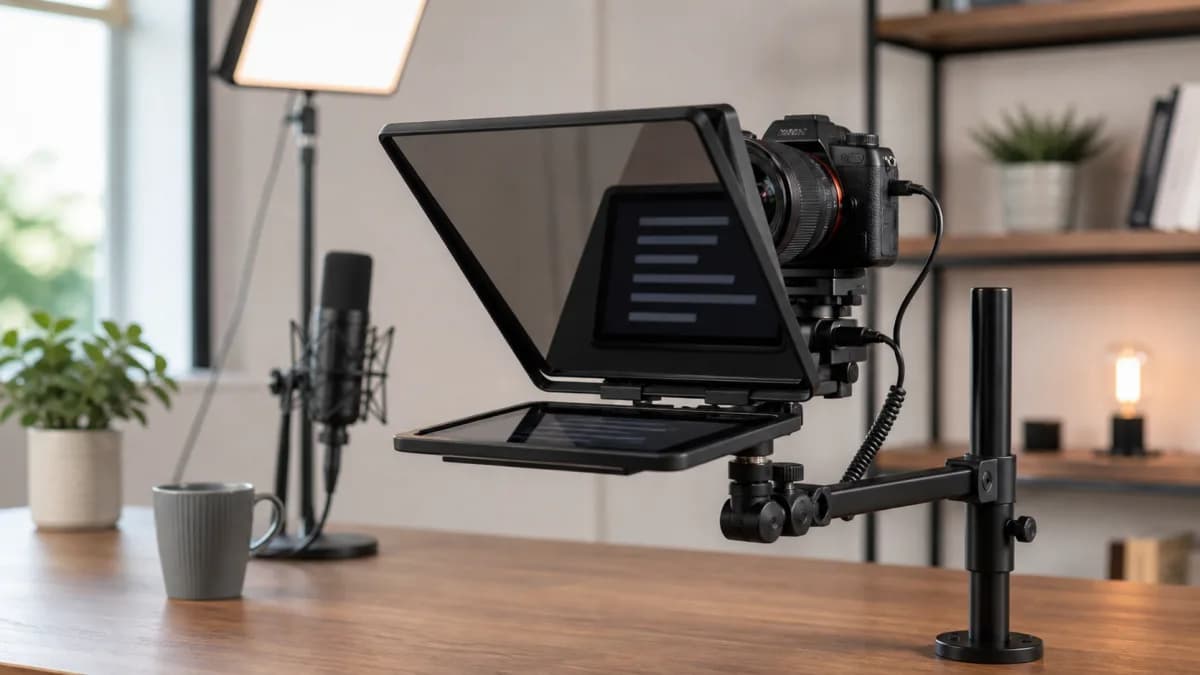
Editorial home-office setup with a desktop teleprompter, mirrorless camera, desk arm, microphone, and key light
Original editorial image for category, fit, and use context; verify the exact linked product appearance and configuration on the retailer page.

Start with eyeline and reading distance

Put the camera at the final height, sit or stand where the recording occurs, and measure from your eyes to the glass plane. Read a sample script at several type sizes. The best prompt size is not the biggest product: it is the smallest setup that keeps eye movement subtle, a useful number of words visible, and the speaker's posture natural at the intended framing.

Verify the complete camera path

Record the camera body, lens, filter thread, focal length, webcam dimensions, and any cage or adapter. Confirm a supported backplate, step-up ring, universal shroud, or phone mount, and make sure the lens centers behind the reflective area. Wide lenses are more likely to see glass edges, fabric, or internal reflections, so test the actual field of view.

Built-in display and tablet models trade different friction

An integrated display can act like another computer screen and keeps a dedicated prompt surface aligned, but it needs the specified USB bandwidth, software, operating system, and cable path. A tablet prompter can cost less and work independently, yet screen size, brightness, mirroring, remote control, device heat, and repeatable placement become the operator's responsibility.

Mount the total moving weight

Add the prompter, display, camera, lens, backplate, cables, and any light or microphone sharing the support. Compare that total with the arm or tripod rating and practical extension. A nominally strong arm can still bounce when typing on the desk or sag when the camera sits far from the pivot. Provide strain relief so USB movement does not shift framing.

Rehearse recovery, not only smooth scrolling

Test manual scrolling, hotkeys, remote controls, and any voice-follow feature with pauses, corrections, emphasis, and ad-libbed sentences. The speaker needs a fast way to stop, jump back, and resume without staring at controls. Record several minutes under normal key lighting to check readable contrast, reflected room objects, autofocus hunting, eye travel, and whether the glass changes image quality.

Current Amazon option

Check this exact product

Elgato Prompter All-in-One Teleprompter with Built-In 9-Inch Display

ASIN
B0CH3P9K1X
Brand
Elgato
Listing checked
8/10/2026

Compare the current title, ASIN, variant, seller, stock, shipping, price, and return path before ordering.

Side-by-side checks

Desktop teleprompter fit worksheet

CheckMeasureReject or change course when
Reading distanceEyes to glass in the real seated or standing positionText must be oversized so far that too little script remains visible.
Camera systemWebcam, phone, mirrorless or DSLR body and lensNo supported backplate, step-up ring, shroud, or stable centered path exists.
FramingLens focal length, field of view, glass edge, reflectionsThe prompt glass or shroud intrudes into the desired shot.
DisplayBuilt-in USB display or existing phone/tabletThe host, cable, resolution, brightness, or mirroring workflow is unsupported.
MountingPrompter, camera, lens, cable, and arm loadDesk arm or tripod cannot hold the complete assembly without sag or vibration.
ControlScroll method, remote, voice tracking, hotkeys, rehearsalThe operator cannot pause, recover, or change pace naturally while recording.

Primary sources

References used for this guide

Public owner context

Questions to answer before buying

Community discussions help surface installation, fit, maintenance, and failure questions. They are anecdotal context, not product specifications or a substitute for current instructions.

  • Reddit r/elgato

    Prompter camera and lens-mount discussions

    Used to identify recurring compatibility questions around smaller lens threads, step-up rings, and camera mounting; no owner comment is treated as a compatibility guarantee.

How this page was governed

Page-specific editorial method

  1. 1.Mock the eyeline, camera height, lens, framing, and reading distance before selecting glass or display size.
  2. 2.Verify exact backplates, rings, shrouds, interface, host requirements, and mounting load from the manufacturer.
  3. 3.Record a test with ordinary room lighting to inspect reflections, eye movement, focus, vibration, and audio handling.
  4. 4.Evaluate the full script workflow from edit to rehearsal, live correction, recording, and teardown—not only the hardware.

Related guide

Video Call Setup Guide for Home Offices

A practical path to better Zoom, Meet, and Teams calls using light placement, camera height, audio basics, and desk layout.

Related guide

USB Document Camera Buying Guide: Detail, Working Area, Focus, and Meeting Apps

Choose a document camera by the objects you show, working distance, autofocus behavior, mounting stability, USB compatibility, lighting, and the meeting or teaching software.

Related guide

Wireless Presentation Clicker Guide: USB, Bluetooth, Range, and Controls

Choose a presentation remote by receiver or Bluetooth path, operating-system support, slide-app shortcuts, range, laser rules, button layout, battery, travel storage, and fallback.

Related guide

USB Switch vs. KVM vs. Dock for Two Computers

Choose the device by what must move between computers: peripherals, displays, charging, Ethernet, or the entire desk.

Related guide

USB Speakerphone vs. Headset for Video Meetings

Choose by room occupancy, privacy, background noise, comfort, pickup distance, and whether several people need one audio device.

Related guide

DP Alt Mode Driver vs DisplayLink: Portable Monitor Guide

Learn why DP Alt Mode normally has no separate driver download, when DisplayLink software is required, and how to verify USB-C video, power, HDMI, cable, and host support before buying a portable monitor.

Related guide

Monitor-Mounted Key Light vs. Desk Lamp for Video Calls

Choose the fixture by camera axis, face distance, desk depth, monitor strength, task-light needs, cable path, and the amount of room light it must overcome.

Related guide

Key Light Placement for Glasses: Reduce Video-Call Glare

Move the light, camera, screen, and glasses angle before buying a brighter panel; use a repeatable placement test that preserves eye light without reflecting a white rectangle.

Related comparison

Best Home Office Lighting for Video Calls in Small Rooms

Choose compact lighting for Zoom, Meet, and Teams calls by face exposure, glare, monitor space, window position, and desk clutter.

Desktop Teleprompter Buying Guide: Camera Fit, Reading Distance, and Display