Deskwise Picks
Browse
Desks

Best Standing Desk for Small Spaces: 3 Compact Picks

Current retailer option

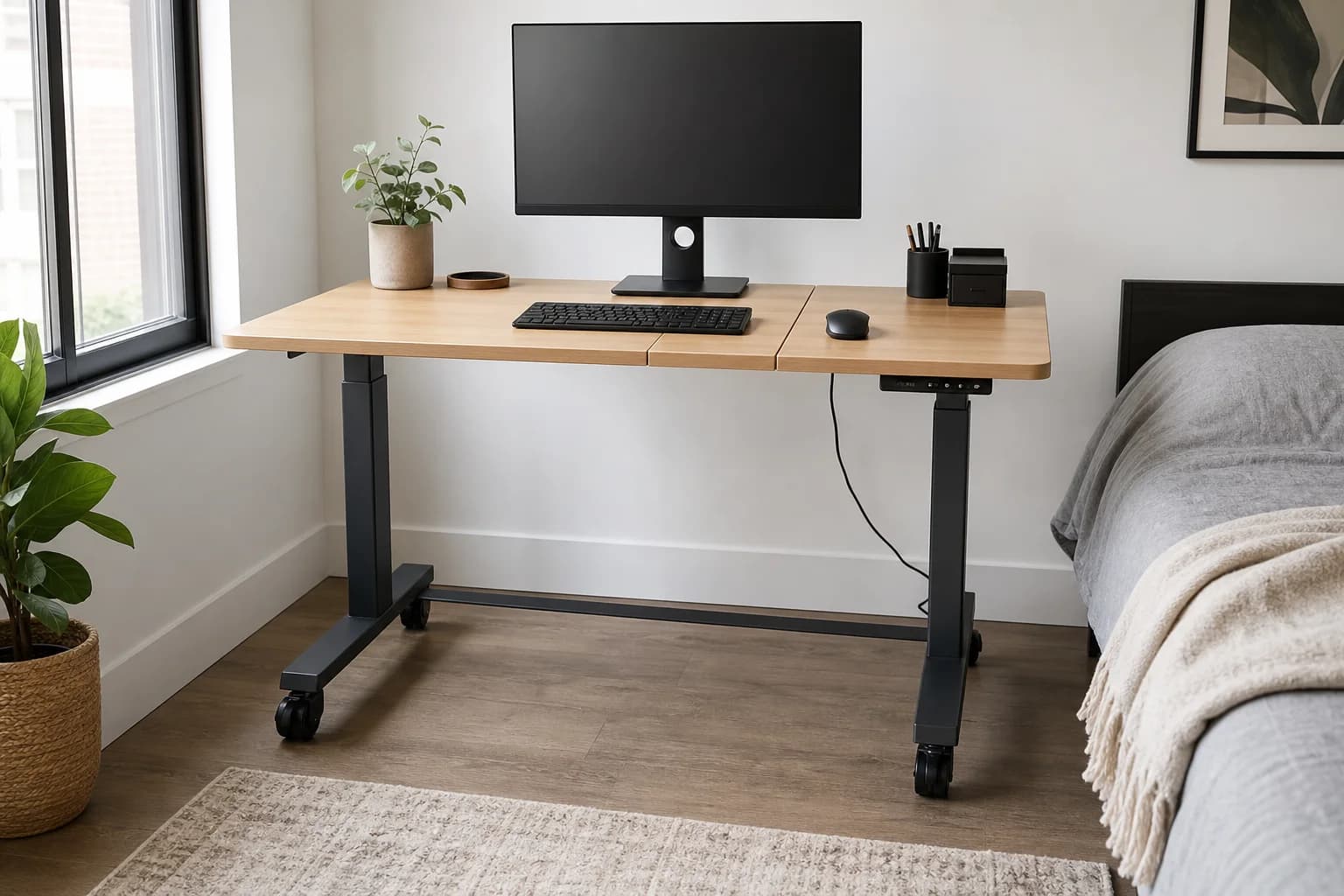
ErGear 48×24 Electric Standing Desk with Wheels

Different product: the first pick has no verified retailer path; this button is for Anker 675 USB-C Docking Station.

Check current price & availability on Amazon

Current price & availability · purchase link

Review details

Compare three compact standing desks for bedrooms and apartments by footprint, depth, wheels, monitor placement, cable travel, and stability.

Updated August 20, 2026

Small-space standing desks are easy to overbuy. A desk can have a great motor and still be wrong if the top is too shallow, the cable path snags when it rises, or the room no longer works as a bedroom after work. Start with the footprint, then check whether the desk can support your monitor, keyboard, and laptop routine without turning every accessory into a separate project.

Quick answer

Start with ErGear 48×24 Electric Standing Desk with Wheels if your main need is a compact sit-stand workstation that occasionally needs to move. Compare the trade-offs before buying, especially a split desktop has seams and more assembly alignment.

Direct answer to the buying question

Which compact or narrow standing desk fits a small space?

Choose from the usable footprint, minimum seated height, desktop depth, monitor-arm clamp area, chair pullout, cable travel and door path—not width alone. A compact desk is a poor fit if the frame stays too high, the top is too shallow, or accessories consume the clearance that made it attractive.

Page structure updated August 13, 2026Evidence checked August 20, 2026Reconfirm exact model and current terms

Related search answers

How links work: As an Amazon Associate I earn from qualifying purchases, at no extra cost to you.

Prices, availability, shipping, coupons, and seller details can change. Always confirm the current product listing and return policy before buying.

Quick comparison

Start here if you already know the job you need the product to solve.

1

ErGear

ErGear 48×24 Electric Standing Desk with Wheels

Best for

A compact sit-stand workstation that occasionally needs to move

Check first

A split desktop has seams and more assembly alignment

Facts

ASIN B0B6JJKSNM · desks

2

FlexiSpot

FlexiSpot E7 Mini Standing Desk

Best for

Bedrooms, closet offices, and narrow work corners

Check first

A 31.5–40-inch top leaves limited room for two monitors, a printer, or large speakers

Facts

ASIN B0F9X3FDYY · desks

3

UPLIFT Desk

UPLIFT V3 Standing Desk

Best for

Long-term workstations with heavier monitors and accessories

Check first

Requires more room than a true compact desk

Facts

$$$$ · desks

Compare the current options

Match the exact model, bundle, seller, coupon, and return window before choosing between the picks.

PickKey fit detailsExact listingWhat can changeUpdated
ErGear 48×24 Electric Standing Desk with WheelsDesktop: 48 × 24 inches; split-board construction in the linked listing · Base: Electric sit-stand frameASIN B0B6JJKSNMMeasure the room path, chair pullout, closet and door clearance, not only the desktop footprintJuly 30, 2026
FlexiSpot E7 Mini Standing DeskProduct type: Electric compact standing desk · Applicable desktop: 31.5–40 in × 23.6–31.5 in (official listed range)ASIN B0F9X3FDYYConfirm that the Amazon configuration is the E7 Mini and check whether the selected option includes both the frame and desktop.July 30, 2026
UPLIFT V3 Standing DeskProduct type: Configurable electric standing desk · Supported desktops: 42–80 in wideConfirm live listingMeasure the configured desktop rather than only the adjustable frame width.July 2, 2026

Quick picks by situation

Small bedroom corner

Prioritize a compact top, quiet lift, and a monitor arm rather than a wide desktop.

Laptop plus one monitor

A small electric desk can work well if the monitor stand does not consume half the depth.

Two large monitors

Move up to a wider premium desk or use monitor arms before committing to a tiny frame.

Rental apartment

Favor easy assembly, fewer wall-mounted accessories, and cable routing that can move with you.

Side-by-side checks

Compact standing desk fit comparison

PickErGear 48×24FlexiSpot E7 MiniUPLIFT V3
Space profileFixed 48×24-in top31.5–40-in official desktop range42–80-in supported desktop range
Best reason to chooseOccasional room-to-room movementPurpose-built narrow frameMore surface and configuration choice
Main fit checkCaster height and locked stabilityTop depth and clamp clearancePermanent floor space and assembly
Skip whenHeavy arm or immovable feel is essentialTwo large monitors need broad surface areaThe room cannot support a 42-in-or-wider top

Smallest, compact, and narrow do not mean the same thing

A smallest-width desk may still have deep feet, a compact frame may accept several desktop sizes, and a narrow top can remain too tall at its minimum setting. Compare the complete working footprint, minimum height, usable depth, base shape, monitor-arm clearance, and chair path before treating any one dimension as the answer.

Measure a narrow standing desk in four directions

Check desktop width, usable depth, chair pullout, and vertical cable travel. Then add door swing, closet access, baseboards, and the monitor arm behind the desk. Taping the complete footprint in the room is more reliable than comparing a single advertised width.

Desktop depth usually matters more than load capacity

Most laptop and one-monitor setups are light enough for a quality electric frame. The harder problem is keeping the display far enough away while preserving keyboard and mouse space. A monitor arm can recover depth, but only if the desk edge has enough clear clamp area.

Design the bedroom conversion path before buying

If the room changes from bedroom to office each day, decide where the chair, walking pad, and loose cables go in each mode. A rolling desk helps only when its locked height still fits the user and there is a clear route that does not block a bed, closet, or doorway.

Plan height travel and cable travel together

Locate the outlet, dock, monitor power, and lighting before assembly. Leave enough slack for the full sit-to-stand range, keep connectors free of tension, and make sure a wall-facing layout leaves room for monitor-arm movement and cable trays.

Delay accessory storage until the core setup works

Shelves, risers, pegboards, and under-desk trays can consume the same clearance needed by a compact frame or monitor-arm clamp. Solve keyboard, mouse, monitor, light, and power first, then add storage only for a recurring problem.
How to choose without overbuying

When to spend more

Spend more when stability, height range, cable movement, and desktop depth affect every workday.

When to spend less

Spend less when the desk is secondary, the setup is laptop-only, or accessories can solve the main constraint.

Compare these details first

Desktop depth and room path
Height range
Cable slack
Assembly and return path

Related setup and buying guides

ErGear 48×24 Electric Standing Desk with Wheels

ErGear

ErGear 48×24 Electric Standing Desk with Wheels

A buyer-focused review of ErGear's 48-by-24-inch electric standing desk with wheels, covering small-room fit, monitor distance, seated height, wheel stability, cable travel, and the exact listing configuration.

Best for: A compact sit-stand workstation that occasionally needs to move

Main caution: A split desktop has seams and more assembly alignment
FlexiSpot E7 Mini Standing Desk

FlexiSpot

FlexiSpot E7 Mini Standing Desk

FlexiSpot E7 Mini dimensions, height range, load rating, presets, and the fit checks that matter in a bedroom, closet office, or narrow workstation.

Best for: Bedrooms, closet offices, and narrow work corners

Main caution: A 31.5–40-inch top leaves limited room for two monitors, a printer, or large speakers
UPLIFT V3 Standing Desk

UPLIFT Desk

UPLIFT V3 Standing Desk

UPLIFT V3 frame dimensions, desktop range, height, capacity, cable management, and the trade-offs versus a compact standing desk.

Best for: Long-term workstations with heavier monitors and accessories

Main caution: Requires more room than a true compact desk

FAQ

Is 48 inches wide enough for a home office desk?

Yes for a laptop plus one or two monitors if you use a monitor arm and keep accessories narrow.

Is a 40-inch standing desk wide enough?

It can be enough for a laptop and one monitor, especially with a monitor arm. Measure the display, keyboard, dock, and any speakers together rather than judging the desk by width alone.

How narrow can a standing desk be?

Width is only half the question. A compact desk still needs enough depth for safe screen distance and enough underside clearance for its frame, cables, and any monitor-arm clamp.

What height range should I look for?

Choose a desk that supports your seated elbow height and standing elbow height without maxing out the motor.

What should I skip in a small standing desk setup?

Skip oversized speakers, deep monitor stands, and decorative desk shelves until the core keyboard, mouse, monitor, and cable path are solved.

Sources and methodology

  • Prioritize desktop depth before width for monitor distance
  • Check lift range against sitting and standing elbow height
  • Account for monitor arms, laptop docks, and cable trays before buying accessories
Best Small Standing Desks: 3 Compact and Narrow Picks