Deskwise Picks
Browse
Ergonomics

Kneeling Chair Buying Guide: Fit Range, Pressure, Adjustment, and Desk Height

Current retailer option

HON Ignition 2.0 Ergonomic Chair

Check current price & availability on Amazon

Current price & availability · purchase link

Review the product

Open the exact family listing to compare the live price, availability, delivery, seller, and returns.

Choose a kneeling chair by body fit, shin-pad pressure, seat angle, adjustment sequence, desk clearance, entry and exit, and whether it complements rather than replaces movement.

Prepared by the Deskwise Picks editorial deskUpdated August 10, 2026

Quick answer

The practical answer

Treat a kneeling chair as an optional alternate seat, not a posture treatment. It is worth trying only when the adjustment range matches the user and desk, the shin support does not create pressure, and entry and exit are safe. Keep a conventional adjustable chair and regular movement available.

Common buying question

Is a kneeling chair worth buying for a home office, and how do I know whether it will fit?

Existing ergonomic chair pages do not address shin loading, angled-seat fit, limited back support, entry difficulty, or alternating between seat types.

Related search answers

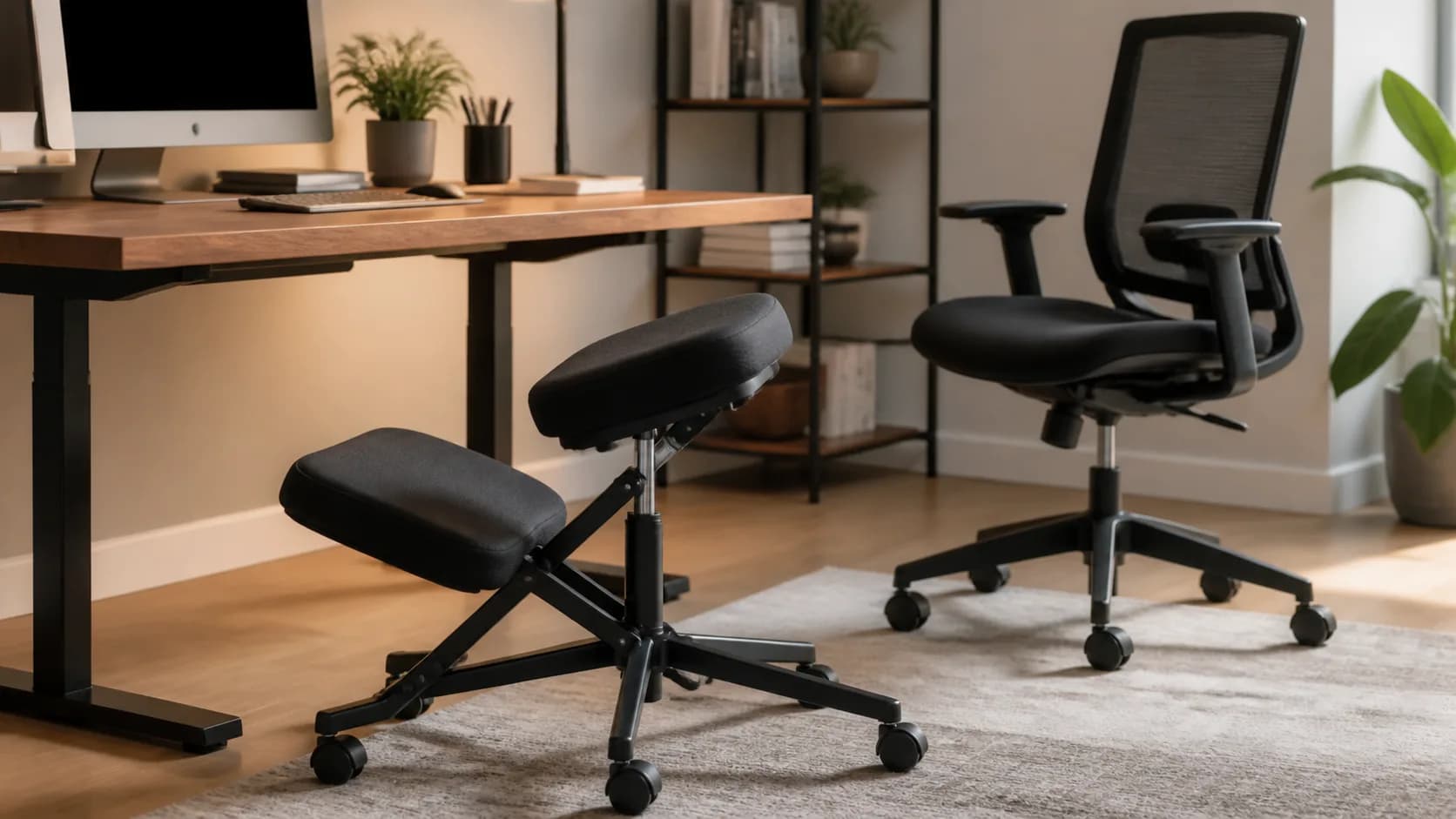
Editorial ergonomic workspace representing an adjustable kneeling chair
Original editorial image for category, fit, and use context; verify the exact linked product appearance and configuration on the retailer page.

Decide whether an alternate seat is useful

A kneeling chair changes how the seat and shin pads share support. It does not remove the need to adjust the desk, keyboard, monitor, breaks, or total sitting time. Define the task and duration it might serve, and keep the current chair available rather than expecting one unfamiliar position to solve discomfort.

Fit the user and desk together

Check user height, body proportions, stated load limit, seat height and angle range, distance to shin pads, foot clearance, desk underside, keyboard height, and monitor line of sight. Shared workstations need an adjustment process that each user can repeat. A broad height claim is weaker than dimensions and a reversible trial.

Pay attention to pressure and transitions

Support should contact the shins rather than concentrate force on the kneecaps. Stop for pain, numbness, swelling, instability, or difficulty standing. People with relevant joint, circulation, balance, mobility, pregnancy, or medical concerns should seek appropriate professional guidance instead of treating marketing language as an assessment.

Inspect frame, wheels, and assembly

Compare frame stiffness, base footprint, fasteners, pad attachment, caster behavior or rocking arc, floor protection, pinch points, and movement under the desk. Retighten only as the manual specifies. A rolling base may ease entry but should not slide unpredictably when weight transfers to it.

Use it as part of position variety

Begin with short, comfortable sessions and rotate among sitting, standing, and movement according to the user's response. Skip the category when desk height cannot be corrected, shin pressure remains uncomfortable, safe entry is difficult, or the return policy does not permit a meaningful home trial. Comfort is individual evidence, not a cure claim.

Current Amazon option

Check this exact product

DRAGONN DN-CH-K01B Adjustable Ergonomic Kneeling Chair

ASIN
B073ZN7B52
Brand
DRAGONN
Listing checked
8/10/2026

Compare the current title, ASIN, variant, seller, stock, shipping, price, and return path before ordering.

Side-by-side checks

Kneeling-chair fit checks

CheckPass signalSkip signal
AdjustmentUser can set hip, knee, and foot position without crowdingOne fixed geometry must serve very different users.
Shin pressurePads distribute contact without pain or numbnessPressure concentrates at knees or shins.
Desk fitHands reach input devices without raised shouldersSeat height collides with desk or forces awkward reach.
Entry and exitUser can sit, stand, and move it safelyMobility, balance, clothing, or workspace makes transitions difficult.
Task durationUsed as one position in a varied dayExpected to force one position for long sessions.
FallbackConventional chair and movement remain availablePurchase requires abandoning a proven comfortable setup.

Primary sources

References used for this guide

How this page was governed

Page-specific editorial method

  1. 1.Evaluate fit and task geometry without promising pain relief, posture correction, or treatment.
  2. 2.Measure the user, desk, keyboard, monitor, and entry path as one system.
  3. 3.Prioritize a reversible trial, clear return terms, and gradual use.
  4. 4.Verify the exact model dimensions and load rating before publication.

Related guide

Office Footrests Buying Guide

Which office footrests are worth buying when the real job is to support the feet when chair height must be set for desk and elbow position? This guide turns that question into model-level checks, a reversible setup, a first-year ownership plan, and a clear skip decision.

Related guide

Standing-desk anti-fatigue Mats Buying Guide

Which standing-desk anti-fatigue mats are worth buying when the real job is to make short standing intervals more comfortable without encouraging all-day static standing? This guide turns that question into model-level checks, a reversible setup, a first-year ownership plan, and a clear skip decision.

Related guide

Monitor Arm Buying Guide for Small Desks

How to check monitor weight, VESA support, clamp clearance, depth, and cable path before buying a monitor arm.

Related guide

Monitor Arm Compatibility Checklist

Check VESA pattern, monitor weight, desk clamp clearance, and cable movement before ordering an arm.

Related guide

Best Monitor Arm Setup for a Walking Desk

Choose and position a monitor arm for viewing distance, standing height, desktop stiffness, clamp fit, cable slack, and controlled movement.

Related guide

How to Reduce Monitor Wobble on a Walking Desk

Trace movement from the floor through the desk, clamp, arm, and screen before replacing a monitor arm that may not be the real cause.

Related guide

USB-C Dock vs Monitor Hub: Which Home Office Upgrade Should You Buy?

Choose a standalone dock or USB-C monitor hub by exact laptop display support, replaceability, charging, Ethernet, DisplayLink needs, and the cable you touch every day.

Related guide

Single vs. Dual Monitor Arms for a Walking Desk

Compare independent adjustment, shared-post leverage, desk stiffness, clamp load, cable movement, and how walking changes screen stability.

Related product guide

HON Ignition 2.0 Ergonomic Chair

A practical HON Ignition 2.0 configuration guide covering seat, arm, lumbar, tilt, seller, return, and warranty checks before buying ASIN B07GNDDNMW.

Related product guide

Branch Ergonomic Chair

A mid-range ergonomic chair with eight adjustment points and a listed seven-year warranty, best evaluated with its fit range, purchase channel, proof requirements, and return cost visible before checkout.

Kneeling Chair Buying Guide: Fit Range, Pressure, Adjustment, and Desk Height